

The Swiss National Cyber Security Centre (NCSC) has issued a critical warning about a sophisticated phishing scam (known as smishing) targeting individuals who have lost or had their iPhones stolen. Threat actors are exploiting the owner's desperation by sending targeted texts claiming the device has been found, with the true goal being to steal Apple ID credentials.
When an iPhone is lost or stolen, owners can enable Lost Mode via the Find My app, which displays a custom message on the lock screen. This message often includes a contact email or phone number for the finder. The NCSC warns that scammers are likely extracting this publicly displayed information to launch a highly personalized phishing attack via SMS or iMessage.
"Losing your iPhone is always annoying. Not only is the device gone, but your personal data may also be lost," the NCSC notes. "Scammers try to exploit the hope that the phone has been found by sending highly convincing text messages that appear to originate from Apple's Find My service."
The Anatomy of the Phishing Attack
The malicious texts include convincing details about the device, such as the phone's model, color, and storage capacity, information that can sometimes be obtained directly from the locked device or the contact information provided.

A typical phishing message reads: "We are pleased to inform you that your lost iPhone 14 128GB Midnight has been successfully located. To view the current location of your device, please click the link below: <phishing url>."

Clicking the provided URL does not lead to Apple's official Find My website. Instead, the victim is redirected to a phishing page designed to perfectly mimic the legitimate Apple login portal. When victims enter their Apple ID and password, these credentials are immediately transmitted to the attackers, granting them full access to the victim’s account.
The Ultimate Goal: Activation Lock Bypass
The true motivation behind this scam is the highly valuable security feature known as Activation Lock. This feature securely links an iPhone to its owner's Apple ID, making it impossible for unauthorized individuals to erase the device or resell it as new.
Since there is no known technical method for criminals to bypass the Activation Lock, they rely on social engineering (phishing) to trick the legitimate owner into willingly handing over the login details. Once they have the credentials, the scammers can remotely disable the Activation Lock, making the stolen iPhone easy to sell.
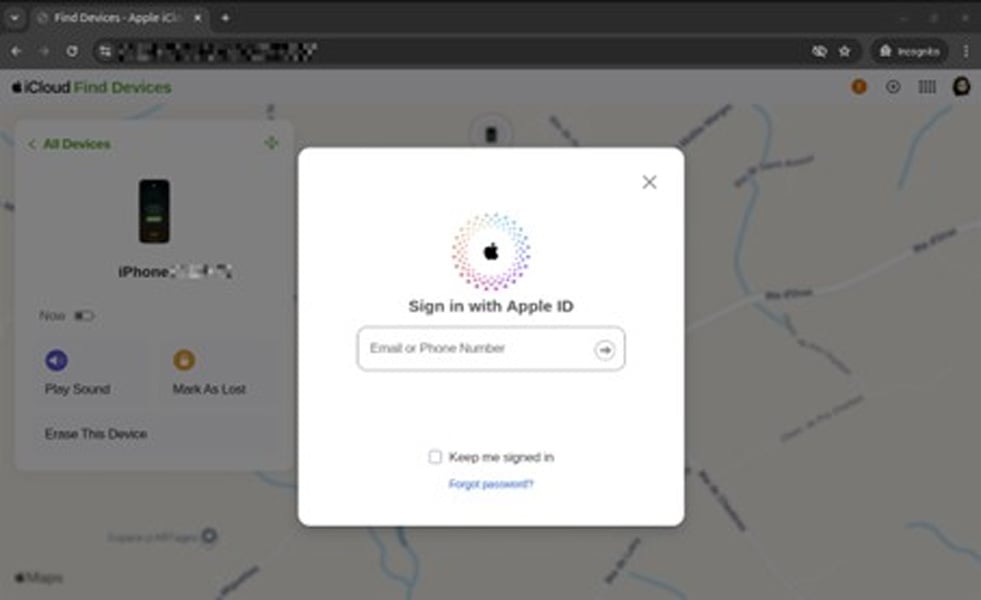
How to Protect Yourself and Your Credentials
The NCSC advises users to ignore all unsolicited texts claiming to have found a lost Apple device, emphasizing that Apple will never contact customers via SMS or email to report a found device.
Follow these essential security steps:
- Never Click External Links: Do not click on links in unsolicited messages. If you need to check your device's status, always navigate directly to iCloud.com/find or use the official Find My app.
- Enable Lost Mode Immediately: If your device is lost, ensure you enable Lost Mode right away via Find My to secure the device.
- Protect Your SIM Card: Ensure your SIM card is protected with a PIN to prevent attackers from misusing your phone number for SMS-based verification codes or other scams.
- Maintain Activation Lock: Keep the lost device registered to your Apple account. This ensures the Activation Lock remains enabled, rendering the device useless to the thief.
- Use a Dedicated Email: If you choose to display contact details on your lost device's lock screen, consider using a dedicated, secondary email address that is not linked to your primary Apple ID.
Frequently Asked Questions (FAQ) 😊
Here are answers to common questions about the Lost iPhone Smishing scam! :D
Q: How do scammers obtain my phone number if they stole my iPhone?
Scammers likely obtain your number in two ways: 1) Directly from the custom message you set on the lock screen via Lost Mode; or 2) By removing the unprotected SIM card from the stolen device and placing it in another phone to access the number.
Q: What is the main reason criminals want my Apple ID credentials?
The main reason is to remotely disable the Activation Lock. Without the owner's credentials, the stolen iPhone is electronically locked and cannot be wiped, reused, or sold for profit. Stealing the Apple ID transforms a worthless brick into a valuable, sellable device.
Q: If I get a text like this, should I contact Apple Support?
You should ignore the text message entirely. Apple advises that they will not contact you via SMS or email regarding a found device. If you are concerned, you should contact Apple Support directly through their official website or phone number, never by replying to or clicking links in the suspicious text.